
 Back
Back 
Building speech-to-text for a real mobile experience reveals much more than differences between models. By comparing local Whisper with cloud-based Voxtral, I discovered that the model is only one part of the product. The technical implementation, the usability of recording on a phone, and the privacy and security of audio, transcripts and server-side inference all influence whether the result is genuinely useful.
Speech-to-text is, in a technical sense, a solved problem. Give even a relatively small model a clean recording of a clearly spoken sentence and it can often produce a useful transcript. The harder question is what happens outside those ideal conditions.
People do not speak like test recordings. Every voice is different. We have accents, dialects and individual rhythms; we hesitate, swallow words, change volume and leave sentences unfinished. The environment adds another layer of difficulty. Imagine sitting in a moving car and giving an instruction to an AI assistant. The speech model must separate your voice from road noise, ventilation, music and other passengers, then recover likely words such as a place name from an imperfect signal. The agent may interpret the instruction in a later step, but if transcription loses the important noun or negation, the entire interaction starts from the wrong premise.
This is where the broader pattern we see across AI appears in speech recognition, too. A small model may perform remarkably well on clean, predictable input, yet lose accuracy as the audio and language become ambiguous. A larger foundation model has more capacity to use context and cope with variation, although that advantage comes with greater demands on memory and computation — or with a cloud service, network use, cost and a wider privacy boundary. Model intelligence does not eliminate poor audio, but it can make the system more resilient when the recording is less than ideal.
So, the practical problem is no longer simply how to turn speech into text. It is how to choose the right level of model for the situation. Users still want the result quickly. They want it to be accurate. They may not want their voice uploaded. A mobile app must balance those expectations while surviving browser permissions, different recording formats, limited memory, an unreliable network, and a screen small enough that every extra choice becomes friction.
I built a small prototype to explore those trade-offs. It offers two paths. The first runs Whisper locally in the browser with Transformers.js. After the model has been downloaded and cached, the recording can remain on the device. The second sends the recording through a small Node server to Mistral’s Voxtral transcription API. That path needs a network connection and lets audio leave the device, but it gives the application access to a cloud model without exposing the API key in frontend code.
The project started as a model selector. It became more interesting when I stopped asking “Which model wins?” and started asking “How can a user experience the difference fairly?”
A Quick Guide to Whisper and Voxtral
Whisper is a family of automatic speech-recognition models released by OpenAI in 2022. It converts spoken audio into written text. Multilingual versions can also recognise multiple languages and translate supported speech into English. OpenAI trained Whisper on 680,000 hours of multilingual and multitask audio, with the aim of making it robust to accents, background noise and technical language. The models were released in several sizes, allowing developers to trade speed and resource use against recognition capability. OpenAI: Introducing Whisper
This demo does not call an OpenAI transcription service. It runs a browser-compatible, quantised Whisper checkpoint through Hugging Face Transformers.js and ONNX Runtime. The comparison uses Whisper Tiny Multilingual, one of the smallest variants, because it can run on a phone and supports German as well as English and other languages. WebGPU can accelerate it in supported browsers, otherwise the app falls back to CPU-based WebAssembly. transformers.js
What is ONNX Runtime? An AI model needs an execution engine in the same way that an application needs a runtime. Transformers.js handles the model and the speech-recognition pipeline; ONNX Runtime Web performs the model’s mathematical operations inside the browser. It can use WebGPU to run them on a supported graphics processor or WebAssembly (WASM) to run them efficiently on the CPU. This is what makes it possible to execute the converted Whisper model on the phone without sending the recording to a transcription server.
Voxtral is Mistral AI’s family of audio models. The app uses the `voxtral-mini-latest` API name for a Mini Transcribe model optimised specifically for converting audio into text. Unlike the local Whisper checkpoint, it runs on Mistral’s infrastructure: the browser uploads the recording through the app’s Node server, Mistral performs the transcription, and the text is returned to the phone. The model therefore does not consume the phone’s memory or processing power, but it requires connectivity and sends the audio beyond the device. Mistral AI: Voxtral Mini Transcribe 2
In short, Whisper represents the local, controllable path in this prototype, while Voxtral represents the managed cloud path. The comparison is not only between two model names; it is between two ways of distributing computation, data and responsibility.
One Recording, Two Execution Models
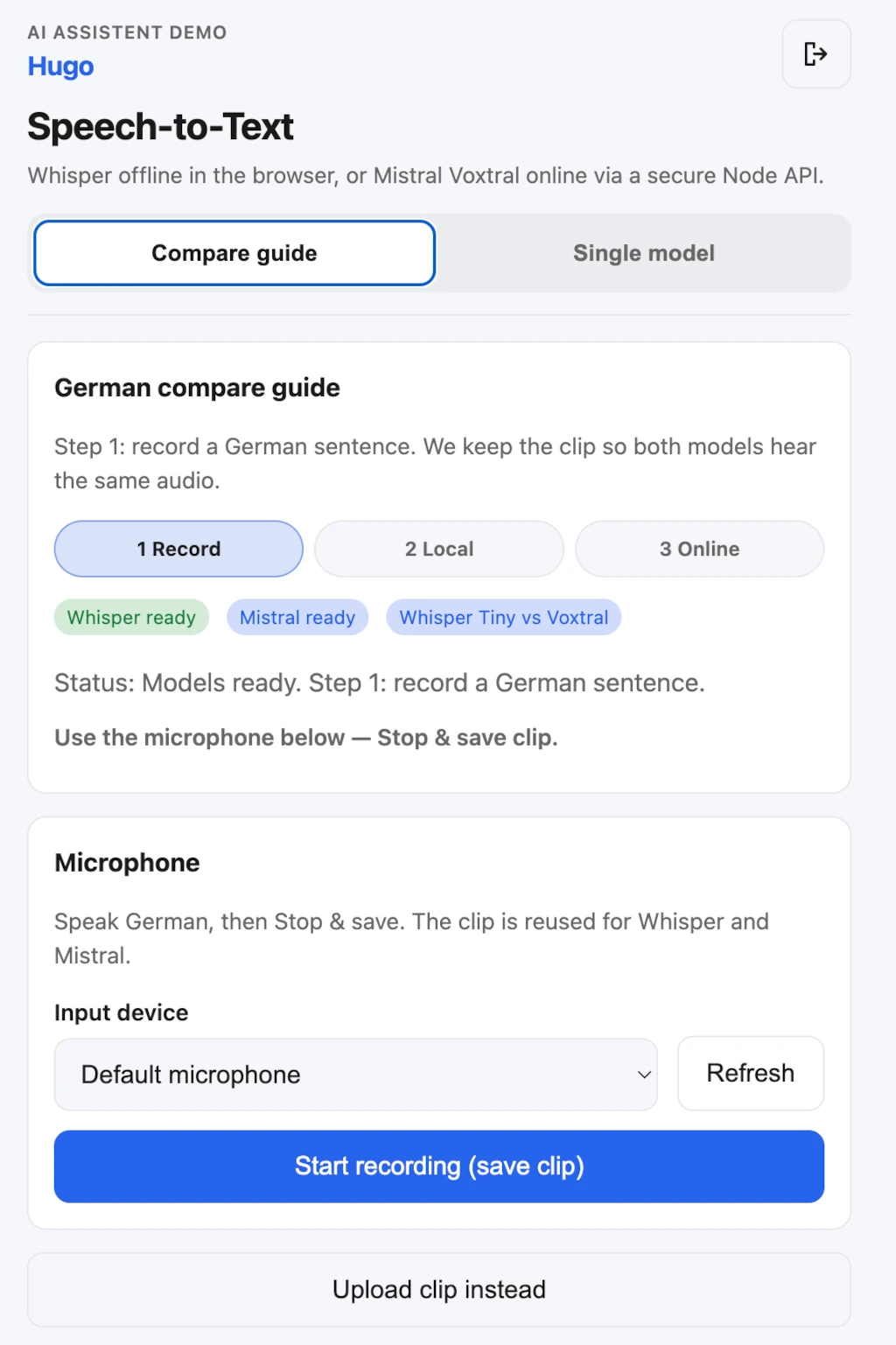
The app’s compare mode is built around a deliberately simple method: record one utterance, save that clip in the browser, and pass the same audio first to Whisper Tiny Multilingual and then to Voxtral Mini. The demo focuses on German because the project was developed in Austria and German is the most relevant everyday test case for us. The method is not limited to German, however. The multilingual Whisper checkpoint and the online model can support English and other languages when the corresponding language setting and test material are used.
That choice affects the local footprint. An English-only checkpoint can specialise its vocabulary and decoding behavior for one language, while a multilingual model must represent speech patterns and tokens across many languages. Multilingual support therefore carries additional model complexity and can require a larger or more resource-intensive local model than a comparable single-language option. For an Austrian use case, that is a deliberate trade: broader language coverage and useful German transcription matter more than minimising the model for English alone. Model labels such as “Tiny” should consequently be compared within their language scope, not treated as identical packages simply because they share a family name.
That detail matters. If I recorded the sentence twice, the result could change because I spoke more clearly, moved closer to the microphone, paused differently, or encountered different background noise. Reusing one blob does not turn the demo into a scientific benchmark, but it removes a large and very human confounder. The comparison becomes easier to understand: same voice, same words, same microphone, same moment — different transcription path.
The two paths diverge after recording:
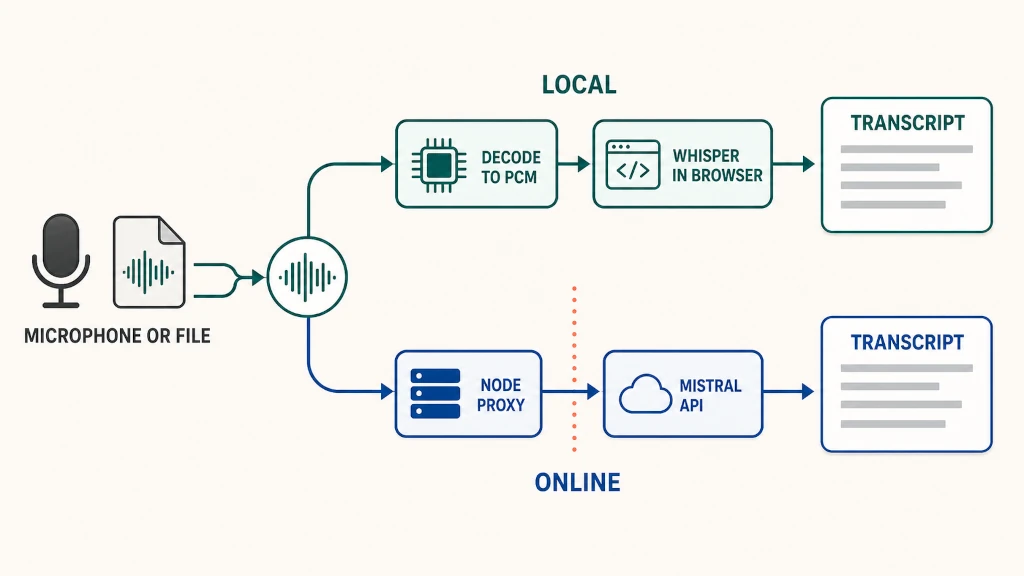
What is PCM? Pulse-code modulation (PCM) simply means representing a sound wave as a sequence of numbers. The browser converts compressed recordings such as WebM, MP4 or MP3 into these raw audio samples so Whisper can process them locally.
The local implementation chooses WebGPU where the browser supports it, with WASM as a fallback. Safari uses the WASM path. Model weights are quantised to reduce their footprint, and the app offers several model sizes. Whisper Tiny is the practical mobile starting point; larger models promise more capacity but demand more download, memory, initialisation time, and computation.
The cloud implementation has less client-side machinery. It uploads the audio to an Express endpoint, which attaches the Mistral API key on the server and forwards the request. That architectural simplicity on the device comes with a different cost: network dependency, API usage, and a privacy boundary that extends beyond the phone.
Offline Does Not Mean Instant
“Runs locally” sounds like “starts immediately.” In practice, those are different claims.
Before the first local transcription, the browser must download a model, cache it, initialise the ONNX runtime, and move enough data into memory to run inference. The smallest models in this prototype are listed at about 39 MB, the largest is about 150 MB. A progress bar can describe the download, but initialisation may continue after the final model file arrives. The app therefore distinguishes downloading from initialising instead of leaving the interface apparently frozen at 99 percent.
In day-to-day use of the prototype, the online path feels faster — especially on the first run — and produces more accurate transcripts when speech is difficult or the recording is noisy. That makes sense: the phone does not have to download, initialise and execute the speech model itself, and the cloud service can run a more capable model on server hardware. Instead, the browser uploads the recording and waits for the result. This is an observed practical advantage rather than a completed benchmark; exact latency and accuracy still need to be measured across fixed recordings and devices.
The speed advantage also depends on what we measure. A cloud request avoids the local model’s cold-start cost, but it pays network and server latency every time. Once Whisper is cached and initialised, local transcription becomes a fairer comparison and may be responsive for short, clean recordings. “Online is faster” is therefore most defensible as a description of this prototype’s current mobile experience, not a universal rule for every device, connection and recording.
This became one of the central product lessons: model state needs to be designed as carefully as recording state. “Not downloaded,” “loading from cache,” “initialising,” “ready,” and “failed” are meaningfully different moments. If the interface collapses them into one spinner, users cannot tell whether they should wait, retry, or choose a smaller model.
Caching changes the experience after the first run. It can make later sessions much faster and allows local transcription without uploading the recording. But browser-managed storage is not permanent in the same sense as an installed native asset. The application can request persistent storage and remember that a model completed downloading, yet storage policy still belongs to the browser. A responsible description is therefore “available offline after caching,” not “installed forever.”
The Model is Only Part of the Story
The project uses pretrained, ready-to-run models, so no model training is involved. Much of the work therefore lies beyond choosing and running a speech model: It is about integrating audio recording, browser capabilities and a reliable mobile experience.
Microphones expose different formats across browsers. MediaRecorder may produce WebM/Opus on one platform and MP4/AAC on another. Some WebM recordings need their duration metadata repaired before decoding. Passing recording blob URLs directly into a speech pipeline can also fail on Safari, so the local path converts the blob into floating-point PCM first. Stereo input is mixed down, the audio context targets 16 kHz, and empty or undecodable recordings produce actionable errors.
The interface carries its own collection of mobile details: safe-area padding for notches and home indicators, dynamic viewport units, 44-pixel touch targets, 16-pixel form controls to prevent iOS focus zoom, a live input meter, and an explicit microphone picker. None of these improves the neural network, but all of them affect whether a user can successfully create the audio the network receives.
That leads to another useful finding: Speech recognition quality begins before inference. A visible level meter, a clear recording state, and a warning about empty audio may improve real-world outcomes more than silently swapping one small model for another.
Privacy must be Visible, not Buried
The prototype uses “on device” and “online” labels in the comparison. This is more than an explanatory copy. The two buttons initiate materially different data flows.
For local Whisper, the audio is decoded and processed in the page. Once the model is cached, the transcription path does not need to upload that audio. For Voxtral, the recording travels to the application server and onward to Mistral. The API key stays on the server, and access to the paid demo is protected, but server-side security does not make the operation local.
A hybrid speech interface should disclose that distinction near the action, not only in a privacy policy. Users should know whether pressing “Transcribe” spends network data, invokes a paid service, or sends their voice to another system. The prototype’s guided sequence makes this boundary unusually concrete: step two stays on the device; step three explicitly goes online.
What the Prototype already Shows
The prototype demonstrates that useful speech-to-text can run directly in a mobile browser. A multilingual Whisper model can be downloaded, cached and executed on the device, while the same interface can offer a more capable online path without exposing the provider’s API key. What once required a native application or specialist infrastructure can now be assembled as a focused web experience with ready-to-use models and modern browser APIs.
It also shows that the architecture can be made understandable to the user. Recording one clip and sending that identical audio through both paths turns an abstract technical decision into something visible: Local Whisper offers privacy and offline operation, while Voxtral provides faster access to a stronger server-side model and, in our practical experience, better results for demanding German speech. Clear loading states, recording feedback and explicit “local” and “online” labels make those differences part of the product rather than hidden implementation detail.
This is a working prototype rather than a scientific benchmark, so the observed differences should not be treated as universal scores. But the central finding is already valuable: Both approaches are viable, and choosing between them depends on the complete experience — audio conditions, device resources, connectivity, privacy expectations and what happens to the transcript next.
The Real Product is the Complete Pipeline
The prototype left me with five main lessons:
- Clean speech is the easy case. Noise, accents, individual speaking styles and incomplete sentences reveal the difference between a small local model and a more capable model.
- Offline does not mean instant. A browser model must first be downloaded, cached and initialised while the online path can often return a better result sooner — especially on the first run.
- Privacy belongs to the complete pipeline. Local speech recognition keeps the original audio on the device, but the interaction is not fully local if the transcript is later sent to an LLM or stored in server-side conversation history.
- Controlled server inference can improve the product. Managing model versions, language settings, prompts, fallbacks and the LLM handoff in one server pipeline can provide better quality and more consistent behavior across devices.
- Local transcription still has a clear role. It is valuable when audio must remain private, connectivity is unreliable, or offline operation is essential. In other cases, the thin-client model — lightweight interface on the phone, demanding computation on the server — may offer the better balance.
Let me finish with two sentences: The microphone button is simple. Deciding what happens after the tap is the real product work.